Pages

Showing posts with label applications. Show all posts

Friday, December 9, 2011

How to Save Time When Re-installing Software After Formatting: Ninite

My laptop is almost 6 years old and I have not formatted it yet. I know that it would be a good idea to wipe the hard drive and to start once again from scratch. I also know that re-installing all my software is going to be time consuming, possibly soul crushing, and overall boring. This is clearly one of those tasks that I try to avoid at all costs. I have found a website that makes the process more bearable. After formatting and re-installing your favourite operating system, fire up your browser and go to http://ninite.com/.

What is so great about Ninite?
On this website you can pick and choose which programs that you want to install on your computer. You will then be able to download the installer. Ninite will download and install all the software that you chose. The great thing is that the process is automated. Usually when you install something you have to click "next", "next"..."finish". This will eliminate that process. All software is up to date and you can re run the installer again to get any new updates. Also a great feature is that it automatically refuses to install any additional tool bars or any other software that will bloat your computer. It is now easier to get all the software that you would download and install in one easy package. You don't have to signup for anything. Just pick what you want and install for free!

Go to the website and take a look at what programs they have to offer. The following is a list of the programs and their categories:


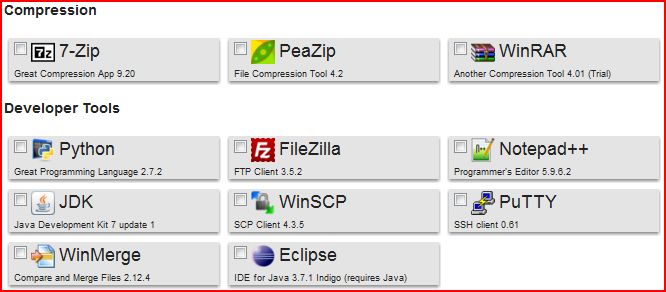

I used this website after formatting a computer at a previous job. This saved me a lot of time and hassle! I'm sure everyone's time is important and we should not have to perform tedious tasks such as re-installing software after formatting. I hope this helps you out in the future!

Tuesday, November 29, 2011

Scheduling Made Easy: Tungle.me

I'm just writing a quick post about a great application that allows you to share your availability with others whether it's for personal or business reasons. The name of this app is tungle.me. This app was created back in 2009 as a start up venture in Montreal, Canada. As of April 2011, they have been acquired by Research in Motion (RIM), the makers of Blackberry phones and tablets. In my opinion this is a great web application!

I first learned of this app when I was trying to schedule a recent job interview. The hiring manager sent me a public link to his tungle profile to show when he was available to meet. I just had to propose a meeting time. This was synced up with my blackberry calendar and also I was sent an email to remind me of the date and time of the interview. Below is an example of the public profile.

The interface is easy to use. Once you have set up a profile you can choose to sync it with other calendar applications such as google calendar, ical, microsoft outlook, blackberry calendar, facebook, and others. Once all calendars are synced up you can see your events and appointments on the tungle.me calendar. The good thing is that when you share your tungle.me calendar with someone else they can't see your events but only see that you are not available or busy at that time. Another great thing is that this prevents double booking. Also the person who wants to propose a meeting does not have to sign up for an account to propose meeting times.

This is definitely a great application to increase productivity. It is a great way to minimize the time and sometimes confusion of scheduling meetings with each other. It is free to sign up for an account. There are also the app versions that you can download for your mobile phone. So far blackberry and iphones are supported. There is no word on an android app on their website but I am sure one will be on its way.

I suggest you check it out and see for yourself if this app can be useful in your life. I think that it will be!
Here is the link again: tungle.me.